Workflowy: Just the tool for Getting Things Done

There’s a chance you’ve read Getting Things Done — a great book which at its core describes a system to externalise ‘to do’ items, taking them from being in your head to being written down somewhere, allowing you not to worry about them until it’s time to take action.

I read the book a while ago and found the system interesting, but never managed to implement it because of practical reasons — while the book describes a system, it doesn’t provide a tool. I tried several tools including a physical notepad (great when you have it with you, useless when you don’t) and web services such as Trello (a good tool for collaborating on a project and capturing its state, but not for lists with several layers of depth) and Google Keep (useful for searchable notes and reminders, but not for long lists or keeping track of projects). None of them were good enough for me to be able to implement the system and reap any of its benefits, and I was left having to keep things in my head.

Just a few weeks ago my interest in the GTD system was rekindled when I came across an article called “GTD in 15 minutes — A Pragmatic Guide to Getting Things Done”. I decided to give it another go using Workflowy, a list keeping service which I had previously discarded because of its (at the time) limited mobile app. I found that this was not the case anymore: the mobile app now has a great range of features including offline support, meaning that you can check and update items even when you don’t have internet access. It also supports unlimited (as far as I can tell) list depth, hashtags, dragging and dropping items between lists, and makes it very easy to add new items or mark things as done.

I read through the 15 minute guide and set about implementing the system in Workflowy. Here are the key things if you want to try it yourself.

Create a Next Actions list

The core insight of the GTD system is that many ‘to-do’ lists contain items that aren’t immediately doable, so they end up getting postponed indefinitely. This might be because they’re too vague (‘exercise’), too large (‘start food blog’), or both. The Next Actions list is David Allen’s proposed solution to this. This list is only allowed to contain items which start with verbs, have no outstanding dependencies, and can be started immediately.

How is this so different from a normal to-do list? The difference is that you can glance at your Next Actions list whenever you have time, pick something, and do it. It becomes a more mechanical process, and removing ambiguity surrounding a task means less chance of getting distracted (I’ve certainly had my fair share of start task -> get confused -> watch tv -> feel guilty and look for another task to start -> repeat process).

How does this system help me keep my list actionable? By having an easy-to-follow structure. New items coming in don’t get added straight to the Next Actions list if they don’t satisfy the criteria, but are added to a temporary In list and processed when convenient. There’s also a Waiting For list for items which have been delegated or have dependencies, and a Projects list for a more high level view. Lastly there’s a list of things you’ll get around to… Someday/Maybe.
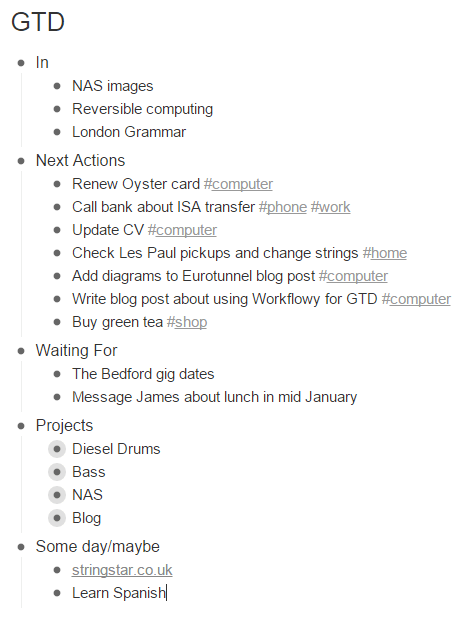
My five lists in Workflowy. Each of the bullets under Projects contains further items or lists.

Create the other lists and add some items

Here’s a more detailed description of each list. Take a few minutes here and try to come up with two or three items to add to each list. Feel free to use my list above for inspiration.

  1. Next Actions: a list of actionable tasks. These are all things that can be picked up by you and worked on given the right context (more on this later), and can include items like “call mum” or “buy bananas”. All of these should start with a verb, and not require input from anyone else to get you started.
  2. In: this is where you jot down anything that occurs to you that you want to follow up on, which as the article mentions can be anything including “your boss telling you to bake her a carrot cake, or seeing a poster for a circus you want to see.” This provides a brain dump that can be processed at a later time into items to go into the other lists.
  3. Waiting For: items you’ve delegated or can’t take action on right now, for example when you’re waiting for feedback from someone, or you’re planning on buying tickets for a festival once they go on sale.
  4. Projects: high level list of things you’re working on. Each of these projects can have one or multiple items associated with it in the Next Actions list. This allows you to keep track of the overarching goals behind items in other lists and come up with new Next Actions.
  5. Someday/Maybe: this might be the most important list of all, at least according to Warren Buffett. These are things you’d like to work on but not right now, and by putting them in this list you can free your mind from thinking about them and come back when you have time.

Maintain the lists

  • All new items will usually be added to the In list first.
  • The In and Waiting For lists should be reviewed regularly and actionable items added to the Next Actions list (unless they would take less than 2 minutes, in which case you should do them immediately).
  • The Projects and Someday/Maybe lists can be reviewed less frequently to check that each active project has a next action defined.
  • The Next Actions list will need to be reviewed continually — whenever you have some time, look through this list and find something you can do. This is where contexts come in.

Contexts are environments associated with certain actions. For example, the ‘buy bananas’ action can be done when at a shop, whereas the ‘fix door handle’ action requires you to be at home and ‘buy festival tickets’ is easiest when at a computer. Workflowy has a great feature for this: by using hashtags (e.g. #shop, #home, or #computer) you can tag each action with one or more contexts, and when you find yourself idle in that context you can display all the items with that tag.

While this gives you enough to get started, in the interest of brevity I’ve skipped over a lot of things which are covered in this 15 minute guide and in more depth in the Getting Things Done book. I would really recommend reading at least the 15 minute guide if you want to use this system, as you’ll win this time back in less than a few days of using it.

Sign up for Workflowy for free and get double the list capacity! This link will give you 500 free items/month, as opposed to the 250 you’d get if you signed up through their website without a referral.

If you liked this article, I would really appreciate if you could share/recommend it and check out some of my other articles below!

View at Medium.com
View at Medium.com

Smart Packing: A Way To Increase Eurotunnel Capacity?

How much more traffic could Eurotunnel carry if cars were loaded in an optimal way?

The Eurotunnel, built in 1994, has grown into one of the most popular routes across the English Channel, taking 10.3 million passengers between England and France every year. A compelling alternative to ferries and the passenger train service, Eurostar, Eurotunnel allows customers to drive their car onto a train in Folkestone and drive off the train in Calais 35 minutes later.

Eurotunnel trains have two decks where cars drive in at the back on one side, and out at the front when the train reaches the other side. Each deck is made up of around a dozen carriages, with doors between them. When a car is too long to fit in a carriage with the other cars already in there, it has to leave a space at the back of this carriage and start a new carriage. This is where there might be potential for improvement — can we make these spaces smaller by loading cars in a different order?

I’ve often taken the Eurotunnel, sometimes having to wait 20 minutes for a train because our car just didn’t fit on the previous train. I’ve also been on trains where there are noticeably large empty spaces in carriages, wondering if these could be eliminated or significantly reduced by being smarter about how cars are loaded onto the train. Just how much spare capacity is there?

How things are packed matters

It’s not difficult to estimate an upper bound on the amount of spare capacity: take a train, count the number of cars per carriage, estimate their lengths, and see how much unused space is left.

So that’s what I did. On a recent train I took, I walked through and counted the number of cars in each carriage, as well as recording their makes and models so I could look up their lengths.

The train I was on had 2 decks with 12 passenger car carriages on each deck, making for a total of 24 carriages. 101 cars were on the train, with between 4 and 5 cars in each carriage.

How many more cars could we fit on if we loaded them in the optimal order?

Based on the length of the cars in the most fully packed carriage, I estimate a carriage to have approximately 23m of usable space in it. This gives us 24 * 23 = 552m of usable space. The total length of all the cars in the train was 460.5m. This leaves 92m, meaning that if the cars had been packed optimally, utilising every last cm of space, we could have packed on 20% more cars…

This is not realistic, of course. Cars come in fixed sizes, so we’ll never be able to do anything about a 1m space at the end of a carriage. But it gives us an upper bound, as we know that we couldn’t possibly fit more cars in when all the unused space is full.

What about a lower bound? I found an alternative configuration for the cars in the train I was on, taking into account the length of each of the cars, which would leave 50.5m of free space at the end of the train. This translates to approximately 10%.

Waiting for the next train

If my train was representative, we could transport 10-20% more cars on each fully loaded train. How significant is this? What costs would be involved?

I’m sure any Eurotunnel executive would love to have an easy way to raise profits by 10–20%, but unfortunately that’s not what this is. This number only applies:

  • During busy periods, when trains run full and there is always a backlog of cars waiting for the next train. Making use of this during less busy periods would imply running trains less frequently, negatively impacting the customer experience.
  • If we can get the cars in the right order. Even if we can work out an improved configuration, is it actually feasible to get the cars in that order given that they probably won’t arrive in that order? Would there be a lot more overhead in terms of time, space, or staff required to do this, which might negate the benefits?

While 10–20% during busy periods might not mean a lot to Eurotunnel’s bottom line, it would mean a lot to the 10 or so cars who would currently be stuck at the front of the queue waiting 20+ minutes for the next train. While this takes care of the first point, we’re still left figuring out how to get the cars in this order.

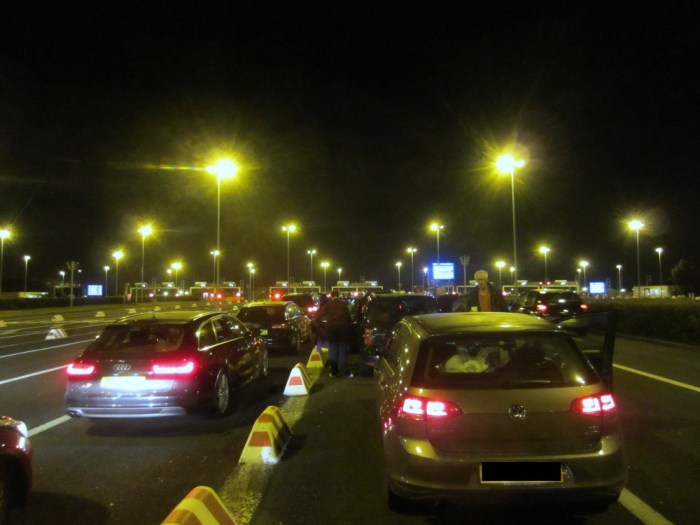
Could another car have fit behind this one?

So let’s take a step back. At this point you might wonder how I arrived at that improved configuration from earlier. Maybe I spent hours in Excel, painstakingly trying out different configurations and seeing which one was best. Or maybe I wrote an algorithm which did that and spat out the best configuration it could find. In fact, I did neither. This is the method I used, starting from the way cars were arranged on the train I was on:

  1. If the first car in a carriage can fit into the carriage in front of it, then move it forward one carriage.
  2. There is no step two. That was it.

This might seem obvious, almost to the extent that it seems wrong.

How could this make any difference? Isn’t that how the cars are loaded anyway?

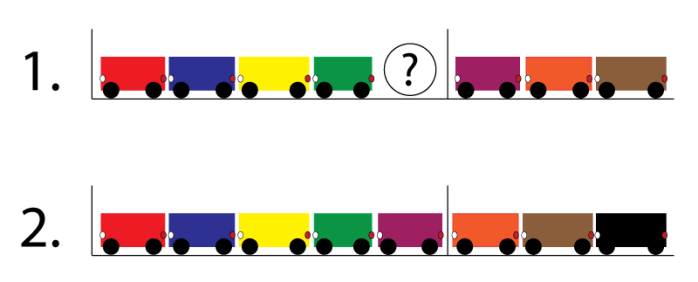
Mostly, yes. But this is not always easy — when cars are being loaded, they’re in a tight line, and having a car go into a carriage to then reverse out of it if it doesn’t fit isn’t an option, as this would require the whole line of cars to move back. This results in scenarios like the diagram below.

Two different scenarios with the same cars

The first case is where there is enough space to fit another car in the carriage, but because it’s hard to tell whether it will fit it doesn’t make sense to risk having the purple car go forward in case it has to reverse out again.

The second case is what would ideally happen, and is the improvement presented in the alternative configuration I suggested.

How can we make this happen?

There are two strategies we could use to turn the first scenario into the second one:

Make trial and error an option

When loading into a tight space, hold back the line of cars while seeing if the car at the front can fit.

Pro: no extra infrastructure needed

Con: extra loading time required

Figure out whether a car will fit in a space before it moves forward

Use a combination of sensors and data about the length of each car to measure whether a car will fit into a space, giving a green or red light to indicate whether a car should proceed to the next carriage or not.

Pro: no extra loading time required

Con: extra infrastructure needed

Conclusions

I would be interested in knowing if the first strategy has been considered, as it could be implemented and tested very quickly. The second strategy would require more planning and investment, but would pay back over time.

The next step would be to make intelligent use of both decks. Since both decks are loaded simultaneously, cars could be redirected onto the deck which would allow them to leave the least unused space in their carriage, with minimal overhead in terms of staff or time — for example, the staff could have an app telling them which deck to direct each car onto, based on where they would make the best use of space.

I can’t imagine there would be anything worth doing beyond that point, but here’s a challenge: you can find the data and my calculations in this shared document. Let me know your ideas, or any improvements on mine. And if you really want to expand on this, collect and share your own data!

Read more, better and cheaper: why you need an ebook reader (if you don’t already have one)


Screens are ubiquitous. Most people carry at least one almost all the time, and some carry two or even three. Why carry another one?

There’s something about reading an actual book. The way you hold it, the places you can take it, the total immersion and lack of distractions. On the other hand, reading on a phone or tablet means you can carry all your books with you in your pocket, everywhere you go.

An ebook reader bridges this gap. Instead of using a power-hungry LCD screen like a smartphone or tablet, an ebook reader has an E-ink screen. This is exactly what it sounds like — an electronic version of a paper page, where individual spots of ink are turned on or off to make up the page whenever the screen is refreshed. Keeping an image on the screen does not use any power, making them ideal for reading.

These screens don’t have a backlight, meaning that they can be read anywhere, including in bright sunlight on the beach, and that the battery lasts for weeks or even months!

Most ebook readers are small, around the size of a paperback book but thinner and lighter, and can hold over 1,000 books, allowing you to take your whole library everywhere in your pocket or purse and even buy books on the go with built-in wireless.

The Kindle Paperwhite — the best ebook reader available

Out of all the ebook readers currently available, the Kindle Paperwhite is the best choice for almost everyone. It’s light, small, has a beautiful high resolution screen with optional light (a must-have for reading in the dark), has great battery life and allows you to buy your books from Amazon’s extensive book library. At only £109, this is one of the best value devices out there and will easily last you several years.

Getting an ebook reader will allow you to read more often, and can save you money in the long run by reducing the amount you spend on each book. Start saving now, buy a Kindle Paperwhite here (UK) or here (US).

The only reasons to buy anything other than a Paperwhite are:

  • You’re adventurous or like to read in the bath. Get a Kobo Aura H2O (£140)
  • You like premium devices, super high resolution screens and spending more money than you need to. Get a Kindle Voyage (£169 Wifi/£229 3G)

Secrets of Bagan: City of Two Thousand Temples

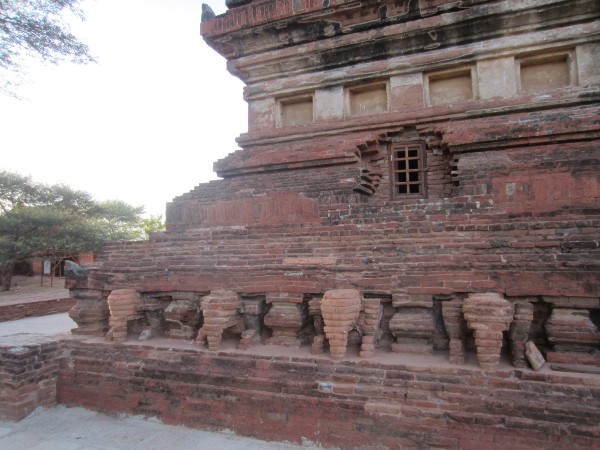
Bagan is the highlight of the Myanmar tourist trail. An ancient city once containing 4000 temples (2200 remain), built between the 11th and 13th century AD, Bagan has a lot to offer. The most popular things to do in Bagan are to rent a bike or horse and cart to explore these temples, and to watch the sun set over the fields full of temples from the top of the ever-busy Shwesandaw Pagoda.

Sitanagyi Paya

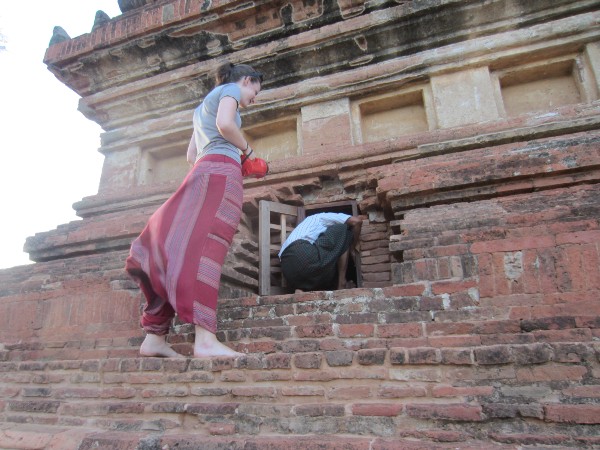
On our second night in Bagan we were out to find a temple we could climb to get a good view of the sunset, without being squeezed in among a mass of people. Our search brought us to Sitanagyi Paya, a few km south of New Bagan. Constructed in the 13th century AD, this temple seemed perfect for us: while we couldn’t find the usual grand entrance containing stairs to the top, there was some bamboo scaffolding going up the side of the temple. As we climbed up the scaffolding a local man stopped us and told us that climbing was not allowed — but there was a way in.

He brought us to a small window in the side of the temple, which he said gave access to a network of tunnels covering the whole of the temple, and led us inside.


Window to the inside

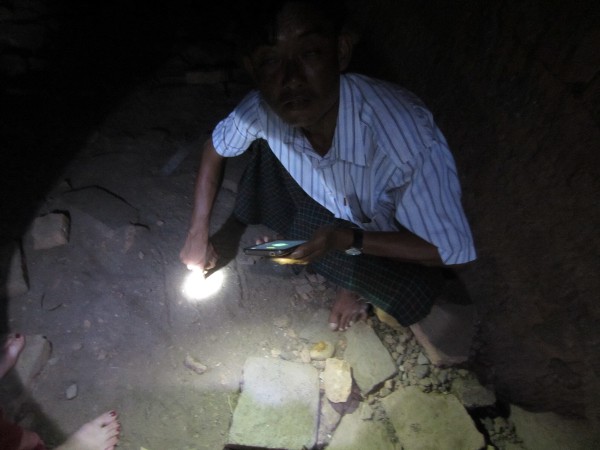
The inside was pitch black and felt like a very narrow cave filled with almost unbearably dense, dust-saturated hot air. He drew a map of how the tunnels were laid out and explained the route we would take. Following him further inside, I became very aware of the immense weight of the temple towering over us. The guide (who is there daily and maintains the temple) was extremely friendly and concerned for our well-being as he led us on, checking with every step that we were ok and happy to go on further.


Our guide’s map and one of the crawl spaces between tunnels

As we adjusted to the darkness in the temple and shone our torches around, we noticed the various forms of wildlife residing there. Our guide quickly put us at ease and assured us that neither the cockroaches, spiders or bats bite humans and demonstrated this by taking one of the spiders in his hand and letting it crawl off.

We entered several different tunnels separated by smaller crawl spaces, as the light from the small window to the outside faded away and the air became even more stifling. As we entered new spaces the bats would fly within inches of our faces— again our guide assured us that they would not get any closer.

Bats

The tunnels themselves had been entered and ransacked by the Japanese during WWII, leaving little of interest other than a headless statue of the sitting Buddha. Despite this the whole experience certainly made this the most memorable temple visit for us in the whole of Bagan, and we would highly recommend it.


A few more general tips for Bagan

  • Though we were reluctant at first, we really enjoyed the half-day horse and cart tour we did. It cost us $12, and allowed us to see all the main temples in a short time while being out of the heat for most of it. Do take care when picking a driver; the first one we spoke to seemed very loud and aggressive and turned out to be drunk.
  • Some people rent bicycles, but the E-bikes (bikes with an electric motor) offer the same freedom, are not much more expensive, and won’t tire you out. We rented ours from Than Dar in New Bagan (061 65272, 09 256228575). The battery lasted for about half a day; when it ran out we just called them and they came to replace it at no extra charge.
  • Be Kind To Animals The Moon in Old Bagan is a great restaurant with a wide range of vegetarian food and lots of great fruit shakes,. We also liked Pwint Mar Lar in New Bagan, which serves local food in large portions.
  • Buddhist temples require you to remove footwear upon entering. Wear shoes that you can easily slip on and off.
  • Check out other resources on the web — I would recommend George and Heidi’s blog and Phil’s blog.

Our friendly cart driver by the full moon